Multi-Event Conversions: Counting the Whole Funnel
By Rinku TeamOct 13, 202611 min read
Most offers do not pay at a single moment. A user registers, a share of them deposit a few days later, a smaller group goes on to buy or deposit again, and every one of those steps is worth a different amount of money. A tracker that records one conversion per click and quietly drops the rest is therefore not simplifying anything, it is deleting the part of the funnel where most of the profit lives.
The Click That Pays More Than Once
Take two zones that each send 10,000 clicks at $0.15, so $1,500 of spend apiece, to an offer that pays $1 for a registration and $20 for a deposit. The numbers are hypothetical and chosen only to show the mechanics.
Zone A
Zone B
Clicks
10,000
10,000
Spend
$1,500
$1,500
Registrations
1,000
800
Deposits
50
150
Payout
$2,000
$3,800
Profit
$500
$2,300
Zone B earns 4.6 times the profit of Zone A, even though it brought fewer registrations, and at this volume 50 deposits against 150 is a gap wide enough to act on. What the buyer sees, however, depends entirely on which event the tracker counts as the conversion.
What counts as a conversion
Zone A
Zone B
Looks cheaper
Registrations only
1,000 conversions, $1.50 each
800 conversions, $1.88 each
Zone A
Every event
1,050 conversions, $1.43 each
950 conversions, $1.58 each
Zone A
Deposits only
50 conversions, $30 each
150 conversions, $10 each
Zone B
Count registrations, or count every event, and the zone that earns almost five times less profit looks like the better one. Only when the deposit is the event that counts does the picture turn around. So which zone would you have cut on Monday morning? Run this across several campaigns and a few networks, and scaling zones for the wrong reason becomes a steady leak in monthly margin that never shows up as a single bad day.
What the Funnel Looks Like in Real Numbers
The gap in that example is not exaggerated. Track360's 2026 funnel benchmarks show how far apart traffic sources and GEOs sit at each stage of the funnel, using median figures for casino and sportsbook offers.
The two GEO tiers turn almost the same share of clicks into first deposits, yet one produces nearly nine times more deposit value per click. On a fixed CPA payout the size of the deposit does not change what the buyer earns, so this gap matters most on revshare and hybrid offers, where deposit value feeds straight into the payout, and it is exactly the kind of difference a single conversion rate hides. These are vendor medians before fraud rejection, so they are better read as a direction than as targets, but the direction is hard to argue with: one conversion number hides the economics.
Ad platforms are pushed toward the same logic. A write-up on Google Ads primary and secondary conversions recommends bidding on the deepest reliable outcome that has enough recent data and keeping easier events as observation only, because shallow events inflate counts while real sales fall.
How Trackers Usually Deal With It
In the three trackers most media buyers use, the default is still one click and one conversion. Voluum discards a repeated click ID unless it arrives with a different transaction ID, and it lets you define custom conversion types, each with its own payout and report column. Binom replaces the earlier payout when a new postback arrives for the same click, unless an Upsell option is enabled on the offer, in which case the payouts are summed. Keitaro overwrites a conversion when the same click ID comes back with the same status, and keeps them as separate conversions only when each postback carries its own transaction ID.
None of that is wrong, but the funnel only survives if the buyer remembers the opt-in, and the opt-in lives in a different place in each tracker: in the postback for Voluum and Keitaro, in the offer settings for Binom. Miss it and the deposit or the upsell simply never shows up, with no error to tell you.
How Rinku Handles It
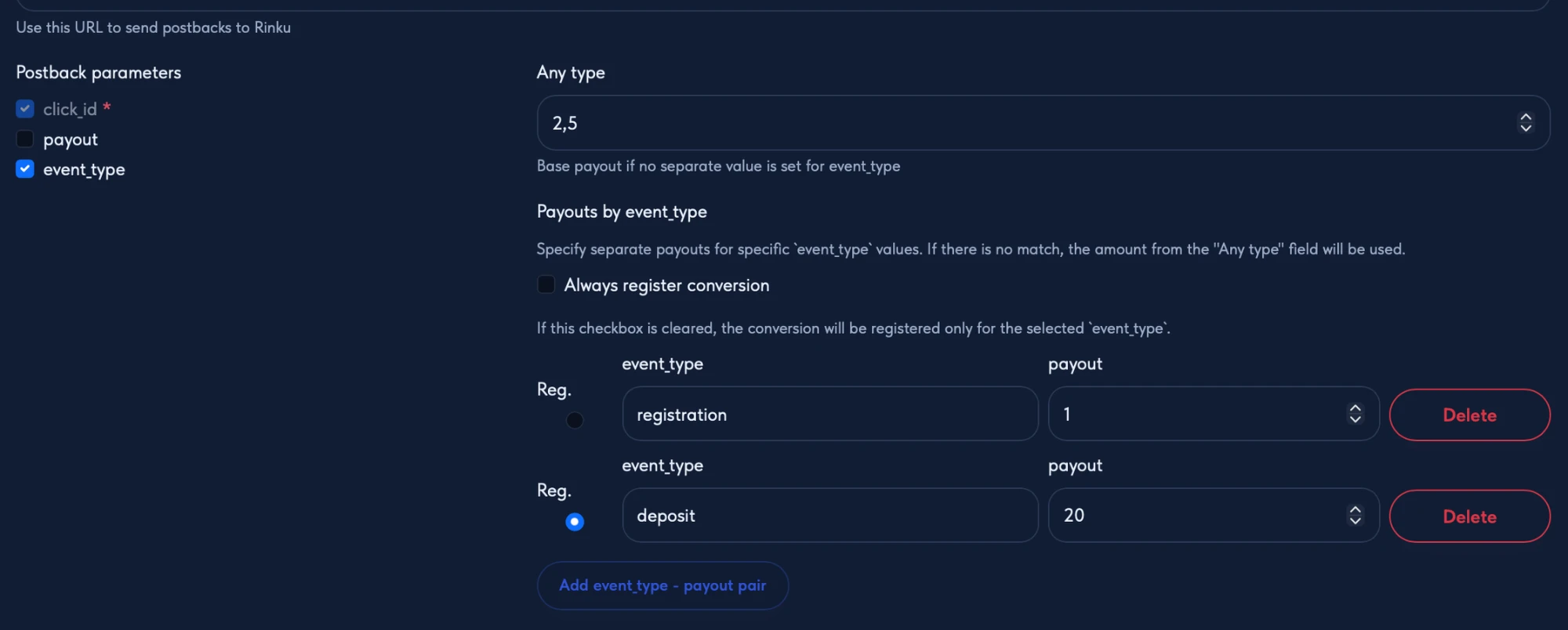
Rinku treats the funnel as the normal case. Every postback an offer network sends becomes its own conversion record on the click, with its own event type, payout and timestamp, so a registration, a deposit and a sale on the same click are three separate rows instead of one row that gets overwritten. There is no transaction ID to remember and no checkbox to hunt for: event type tracking is switched on in the offer, and the event name travels in the postback.
Once events are tracked, each one can be priced separately at the offer level. When a postback arrives, Rinku looks for the payout in a fixed order.
Order
Where the payout comes from
1
The payout in the postback itself, if the offer is set to use it
2
The price set for that event type in the offer
3
The offer's default payout
4
Zero, if none of the above exist
With event prices of $1 for a registration, $3.50 for a deposit and $10 for a sale, and a default payout of $2.50, the result looks like this.
Event in the postback
Payout recorded
reg
$1.00
deposit
$3.50
sale
$10.00
lead (no price set)
$2.50
No event type
$2.50
A network that never sends a payout still produces the right number per event, and an event nobody planned for still gets the default instead of nothing.
The event name is matched exactly. When a network sends ftd for a first deposit or dep for a deposit, Rinku looks for that exact label in the offer's pricing rules, uses that event's payout if it finds it, and falls back to the offer's default payout if it does not. The names in the offer should therefore be written character for character as the network sends them, because a price set for deposit will not catch an event labeled dep.
Choosing the Event That Counts
The part that changes the decision is choosing which event counts as the conversion. Set to count everything, every event is a conversion. Set to a specific event, such as the deposit, only that event counts toward conversions, while the others are still recorded and stay visible on the click. In the reports, CPA is the cost divided by the counted conversions, so counting the deposit turns the CPA column into cost per deposit, which is what turned the Zone A and Zone B example around, while counting everything leaves it as a cost per event.
Only the deposit counts as the conversion, so CPA becomes cost per deposit.
Optimization rules read the same numbers. A rule can combine cost, conversions, CPA, ROI, profit and bot rate over a rolling window with a minimum number of clicks, and with the deposit counted, the conversions and CPA inside that rule are deposits and cost per deposit. A rule such as "cost above a set amount while conversions stay below a set number" now describes deposits, so a zone that burns budget on cheap registrations without producing deposits can be flagged or blocked automatically, before a registration-based view would have raised any concern.
Deposits rarely arrive on the day of the click, and this is where the setting meets the clock. A rule's time window is built from the time of the click, and any conversion that arrives later on those clicks is counted in the numbers, so a zone's cost per deposit keeps improving as deposits land. The flip side is that a young window overstates the cost: a zone judged on deposit CPA over the last hour has not had time to collect its deposits. A rule on deposit economics therefore works better with a window of several days and a minimum click sample, and a zone's numbers are better read as final only after the offer's typical deposit delay has passed, with around three days a reasonable starting point for offers that lag by a day or more. Rinku also keeps tracking conversions that arrive after a zone was blocked, so a zone cut too early can be reopened.
Because the counting rule lives in the offer and the postback URL lives in the traffic source, the same source can be fed different signals by different campaigns. A campaign on one offer can count deposits while a campaign on another offer counts registrations, each with its own prices. The offer network talks to Rinku, Rinku sorts every postback by offer, and the source hears only what that offer decided to count.
It decides what the traffic source hears as well. When the source has a postback URL set, Rinku sends it a postback for every event that counts as a conversion, carrying that event's payout, so if only the deposit counts, the source learns about deposits and not about the cheap registrations in between. In the Zone A and Zone B example that changes what the network sees.
Counting rule
Postbacks sent for Zone A
Postbacks sent for Zone B
Zone the source sees as stronger
Registrations only
1,000
800
Zone A
Every event
1,050
950
Zone A
Deposits only
50
150
Zone B
The registrations still happened and are still recorded in Rinku, but the source is told only about the events the buyer decided are worth optimizing toward, so whatever optimization the network runs on postbacks works from the deposit and not from the registration.
What the Reports Show
Open any click and every event on it is listed in order, with its type, its payout and the time that passed since the click, which is the quickest way to check whether a source's registrations turn into deposits and how fast.
In the zone report the click count stays at one while the conversions and payouts of its events add up, so profit and ROI reflect the whole funnel and not its first step. Reports can also split conversions, postbacks and revenue by event type, so a campaign that produces registrations, deposits and sales shows each of them separately, and a zone that looks average overall can be seen for what it is: strong on one event and weak on another. For the example above, with every event counted, the numbers split by event type like this.
Event type
Zone A conversions
Zone A revenue
Zone B conversions
Zone B revenue
Registration
1,000
$1,000
800
$800
Deposit
50
$1,000
150
$3,000
Postbacks that arrive without an event type are not lost either: they are recorded with the default payout and grouped under a blank label in that breakdown, so traffic that skips the event name stays visible instead of disappearing.
A conversion rate above 100% is normal when every click produces several counted events. Here the rate measures counted events per click and not unique users, so a zone with 100 clicks and 250 conversions shows 250%, which means 2.5 counted events per click on average and not 2.5 converting users. It shows how deep users go and does not mean something is broken.
Setting It Up
The setup lives in the offer and takes a few minutes, and most of the care goes into the event names.
Step
What to do
What to check
1
Switch on event type tracking in the offer's postback settings
The offer now expects an event name in each postback
2
Add each event the network will send, with its payout
The name matches the network's label character for character
3
Choose which event counts as the conversion: all events, or one specific event
CPA and conversions in the zone report now follow that event
4
Set the default payout
Unpriced events and postbacks without an event type get this value
5
Copy the offer's postback URL into the network
If the network cannot pass the event name as a macro, create one postback per event with the name fixed in the URL
6
After the first real postbacks, open a click
Event type and payout are right, and no event appears twice
Two Things to Plan For
Conversion caps count conversions and not clicks, so an offer capped at 100 where every click produces three counted events is full after 34 clicks.
And Rinku does not deduplicate repeated postbacks: each one it receives is stored as its own conversion, so if a network re-sends the same sale it will show up twice. On the click it appears as two identical rows with the same event type and payout, which is what to look for in the first days of a new offer, and worth raising in the network's postback settings before trusting a number that looks too good.
If the money arrives after the registration, the question to ask a tracker is not how many conversions it recorded, but which event it counted and what it did with the ones that came after the first.
Rinku is an ad tracker for media buyers who want to find losing zones fast and scale the ones that pay.
Rinku tracks every event of the funnel on its own, and you can try it at rinku.cc with a 14-day free trial.